There may be times when you need a form field to only accept certain data. Specifically, only allow email addresses from a specific domain to be entered in the form field. We can accomplish this by using control input validation with a regular expression in a Nintex Automation Cloud (NAC) form.
Form Scenario
We want to include a form field that only accepts email addresses with “techrhodes.com” as the domain. Any email address entered with another email domain with cause the field to be invalid, show a custom validation message, and not allow the form to submitted until corrected.
Solution
Here are the steps to accomplish this scenario:
- Insert a “Text – Short” action into your workflow.
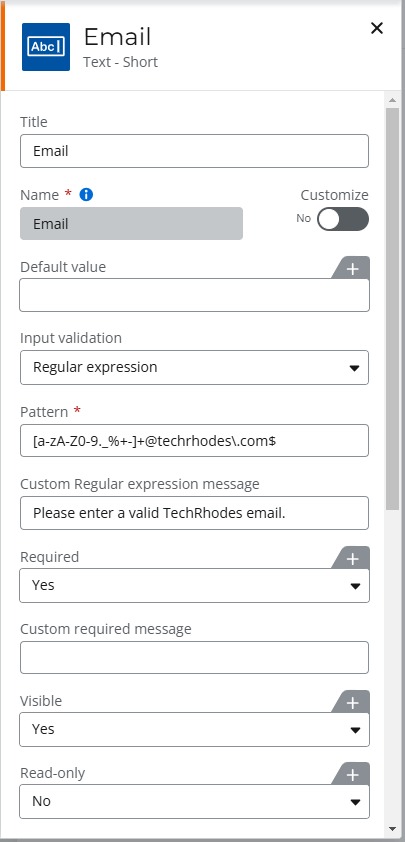
- Configure it with the following settings:
- Title = Email (or whatever you would like)
- Input Validation = Regular expression
- Pattern = [a-zA-Z0-9._%+-]+@techrhodes\.com$
- Where the “techrhodes.com” is the only desired domain for emails.
- Replace the “techrhodes.com” with your desired email suffix.
- Custom Regular expression message = “Please enter a valid TechRhodes email.” (Enter your custom message)
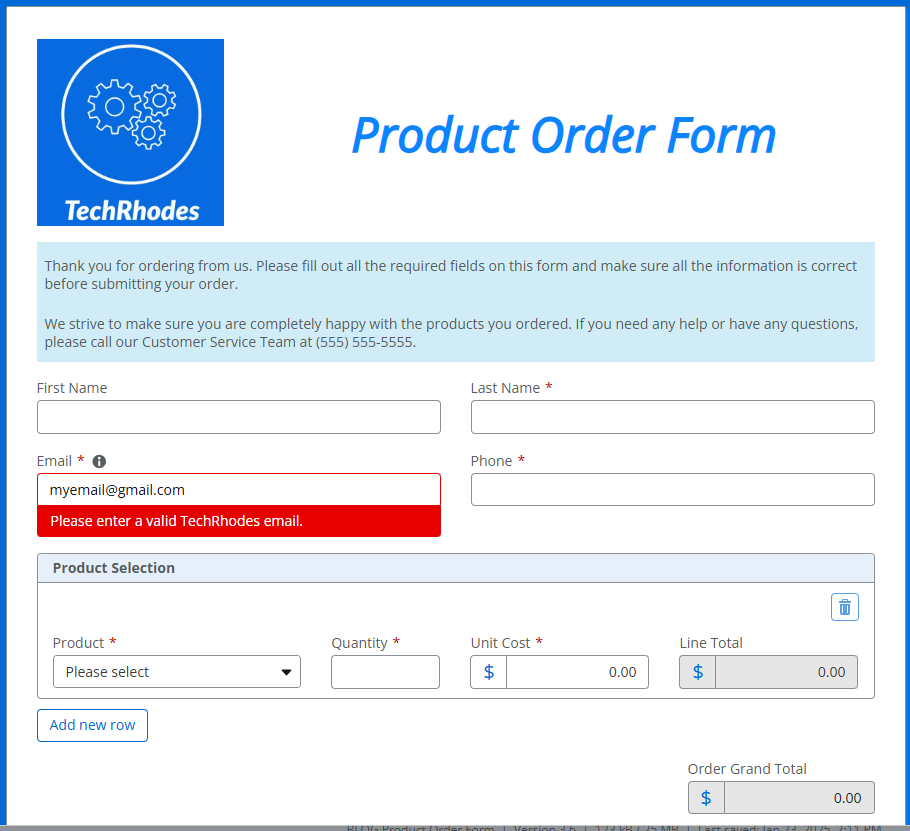
- Result: Any email entered without the “techrhodes.com” domain (or your selected domain) will trigger the field validation message and not allow the form to be submitted.
Result
Any email entered without the “techrhodes.com” domain (or your selected domain) will trigger the field validation message and not allow the form to be submitted.
 TechRhodes
Leave a comment