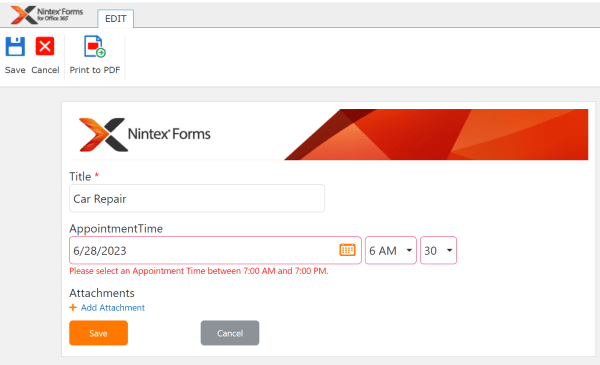
In this scenario, we need to ensure that a form user can only select an appointment time during our business hours (for example, between 7:00 AM and 7:00 PM). On the Nintex form, we have a Date/Time control named AppointmentTime. If the user selects an appointment time outside of business hours, then the form will... Continue Reading →
Schedule a Workflow to Run on the First Day of the Month in Nintex Automation Cloud (NAC)
I recently needed to build a workflow in Nintex Automation Cloud (NAC) that only runs on the first day of each month. I knew the workflow needed to be configured as a “Nintex Scheduled start” start event, but there is currently not a configuration option in NAC to run it on the first day of... Continue Reading →
Regular Expression to Extract the First Part of a URL in Nintex Workflow
Using the Regular Expression action in Nintex Workflow, you can extract the first part of a URL and store it in a workflow variable to use in the rest of the workflow. Follow these steps to build out this functionality: Add a Regular Expression action to the workflow. Configure the action with the following options:... Continue Reading →
Show and Hide Group Controls Using a Choice – Multiple Field in a Nintex Workflow Cloud (NWC) Form
In this video, I show you how to show and hide Group controls using a Choice - Multiple control in a Nintex Workflow Cloud (NWC) form. As part of this solution, I will also show you how to configure Form Rules to accomplish this dynamic functionality. https://www.youtube.com/watch?v=X_5FuUU7Dg4 Show and Hide Group Controls Using a Choice... Continue Reading →
Show and Hide a Group Control Using a Checkbox in a Nintex Workflow Cloud (NWC) Form
In this video, I walk you through you how to show and hide a Group control using a Checkbox control in a Nintex Workflow Cloud (NWC) form. As part of this solution, I will also show you how to configure a Form Rule to accomplish this dynamic functionality. https://youtu.be/w-8YnWdWWRo
How To Restrict Numeric Data Entered to a Certain Number of Digits in a Nintex Workflow Cloud Form (NWC)
You can easily configure a form field to only accept a certain number of digits as input. This configuration also will not allow text or special characters to be entered in the form field. This post will show you how configure this in a Nintex Workflow Cloud form. This solution can be useful to validate... Continue Reading →
Set Up Age Verification on a Date/Time Control in a Nintex Workflow Cloud Form (NWC)
In this scenario, we need to verify that a user is older than a certain age (i.e. 18 or 21) based upon a date of birth entered in a Date/Time form field. This can be accomplished by creating a Submit Rule to validate the date field. Follow these steps to build out this functionality: Add... Continue Reading →
Validate a Single Email Address Field in a Nintex Form
I recently built a Nintex Form that included a field where the user was asked to fill in their email address. The form needed to verify that the user was entering a valid email address. This can be accomplished using a Regular Expression in the settings of the form control. Below are the steps and Regular... Continue Reading →
Get a Parameter within a URL Using a Regular Expression in Nintex Workflow
Recently had a need to extract a parameter from within a URL string using Nintex Workflow. Specifically, I needed to get the ID parameter from a URL. In the example URL below, I needed to extract the number 987: //mysite/mypage.aspx?ID=987&User=654 Follow these steps to get the ID number: Open the Nintex Workflow designer and add a Regular... Continue Reading →
Remove Line Breaks in Text Using a Regular Expression in Nintex Workflow
You can remove line breaks in a text string using the Regular Expression action in Nintex Workflow. Here are the steps to follow: Insert a Regular Expression action into your Nintex Workflow. Configure it with the following settings: Pattern = [\r\n] Replacement text = Keep this empty (or use a replacement character) Input text = Insert your text string (you can insert... Continue Reading →