Validating data in a form is a crucial part of data collection in an automation process. You can configure a text field on a form to only accept numeric values as input. This configuration also will not allow text (alphabetic) or special characters to be entered in the form field. This post will show you... Continue Reading →
Create a Unique Item ID in a SharePoint Online List with Nintex Automation Cloud (NAC)
I cannot tell you how many times that I have seen a new item created in SharePoint list with the default Title field empty. You have probably seen this too if you have been working with SharePoint for any length of time. You go to a list view and all the items have an empty... Continue Reading →
Allow Only Text Character Input in a Nintex Automation Cloud (NAC) Form
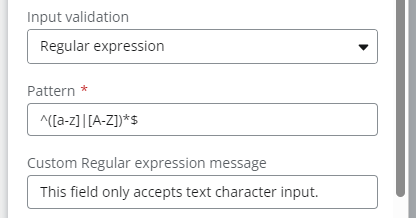
Validating data in a form is a crucial part of data collection in an automation process. You can configure a text field on a form to only accept text (alphabet) characters input. This configuration also will not allow number or special characters to be entered in the form field. This post will show you how... Continue Reading →
Nintex Community Spotlight User for November 2023
I am truly honored to be chosen as the Nintex Community User Spotlight for November 2023. Nintex has created a range of user spotlight blogs to get to know and show appreciation for their most active Community users. I have been a member of the Nintex Community site since 2014 and have learned so much... Continue Reading →
Schedule a Workflow to Run on the First Day of the Month in Nintex Automation Cloud (NAC)
I recently needed to build a workflow in Nintex Automation Cloud (NAC) that only runs on the first day of each month. I knew the workflow needed to be configured as a “Nintex Scheduled start” start event, but there is currently not a configuration option in NAC to run it on the first day of... Continue Reading →
Regular Expression to Extract the First Part of a URL in Nintex Workflow
Using the Regular Expression action in Nintex Workflow, you can extract the first part of a URL and store it in a workflow variable to use in the rest of the workflow. Follow these steps to build out this functionality: Add a Regular Expression action to the workflow. Configure the action with the following options:... Continue Reading →
Show and Hide Group Controls Using a Choice – Multiple Field in a Nintex Workflow Cloud (NWC) Form
In this video, I show you how to show and hide Group controls using a Choice - Multiple control in a Nintex Workflow Cloud (NWC) form. As part of this solution, I will also show you how to configure Form Rules to accomplish this dynamic functionality. https://www.youtube.com/watch?v=X_5FuUU7Dg4 Show and Hide Group Controls Using a Choice... Continue Reading →
Show and Hide a Group Control Using a Checkbox in a Nintex Workflow Cloud (NWC) Form
In this video, I walk you through you how to show and hide a Group control using a Checkbox control in a Nintex Workflow Cloud (NWC) form. As part of this solution, I will also show you how to configure a Form Rule to accomplish this dynamic functionality. https://youtu.be/w-8YnWdWWRo
How To Restrict Numeric Data Entered to a Certain Number of Digits in a Nintex Workflow Cloud Form (NWC)
You can easily configure a form field to only accept a certain number of digits as input. This configuration also will not allow text or special characters to be entered in the form field. This post will show you how configure this in a Nintex Workflow Cloud form. This solution can be useful to validate... Continue Reading →
Set Up Age Verification on a Date/Time Control in a Nintex Workflow Cloud Form (NWC)
In this scenario, we need to verify that a user is older than a certain age (i.e. 18 or 21) based upon a date of birth entered in a Date/Time form field. This can be accomplished by creating a Submit Rule to validate the date field. Follow these steps to build out this functionality: Add... Continue Reading →