There may be times when you need a form field to only accept certain data. Specifically, only allow email addresses from a specific domain to be entered in the form field. We can accomplish this by using control input validation with a regular expression in a Nintex Automation Cloud (NAC) form. Form Scenario:In the example... Continue Reading →
Regular Expression to Extract All Characters Before a Specific Character in Nintex Automation Cloud Workflow
You can extract all the characters before a specific character in a string using a regular expression in a Nintex Automation Cloud (NAC) workflow. Here are the steps to follow: Insert an "Apply a Regular Expression" action into your workflow. Configure it with the following settings: Input text = Your text string (you can insert a... Continue Reading →
Customize Form Label Control Background Color with CSS in Nintex Automation Cloud
I was recently working on a Nintex Automation Cloud (NAC) form that contained a label control containing instructions at the top of the form. I wanted to make this instructions section stand out by adding a background color, but quickly realized that this did not seem possible with the default Label control text editor. After... Continue Reading →
Display Start Form Repeating Section Data on a Workflow Task Form in Nintex Automation Cloud
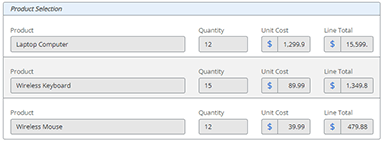
This blog post will show you how to effectively display repeating section data in a task form in your workflows. One of the many great features in a Nintex Automation Cloud (NAC) form is the Repeating Section control. Form designers have the ability to add a dynamic section of repeating rows to collect input data.... Continue Reading →
Allow Only Numeric Value Input in a Nintex Automation Cloud (NAC) Form
Validating data in a form is a crucial part of data collection in an automation process. You can configure a text field on a form to only accept numeric values as input. This configuration also will not allow text (alphabetic) or special characters to be entered in the form field. This post will show you... Continue Reading →
Allow Only Text Character Input in a Nintex Automation Cloud (NAC) Form
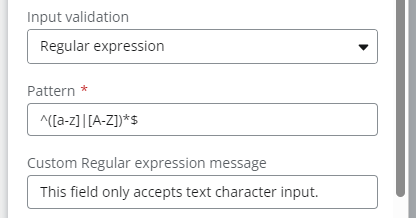
Validating data in a form is a crucial part of data collection in an automation process. You can configure a text field on a form to only accept text (alphabet) characters input. This configuration also will not allow number or special characters to be entered in the form field. This post will show you how... Continue Reading →
Regular Expression to Get the First Digit Before a Decimal Point in a Nintex Automation Cloud (NAC) Workflow
Using the "Apply a Regular Expression" action in Nintex Automation Cloud (NAC) workflow, you can get the first digit (ones digit) before a decimal point. Here are the steps to follow: Insert an "Apply a Regular Expression" action into your workflow. Configure it with the following settings: Input text = Number from a workflow variable... Continue Reading →
Schedule a Workflow to Run on the First Day of the Month in Nintex Automation Cloud (NAC)
I recently needed to build a workflow in Nintex Automation Cloud (NAC) that only runs on the first day of each month. I knew the workflow needed to be configured as a “Nintex Scheduled start” start event, but there is currently not a configuration option in NAC to run it on the first day of... Continue Reading →
Show and Hide Group Controls Using a Choice – Multiple Field in a Nintex Workflow Cloud (NWC) Form
In this video, I show you how to show and hide Group controls using a Choice - Multiple control in a Nintex Workflow Cloud (NWC) form. As part of this solution, I will also show you how to configure Form Rules to accomplish this dynamic functionality. https://www.youtube.com/watch?v=X_5FuUU7Dg4 Show and Hide Group Controls Using a Choice... Continue Reading →
How To Restrict Numeric Data Entered to a Certain Number of Digits in a Nintex Workflow Cloud Form (NWC)
You can easily configure a form field to only accept a certain number of digits as input. This configuration also will not allow text or special characters to be entered in the form field. This post will show you how configure this in a Nintex Workflow Cloud form. This solution can be useful to validate... Continue Reading →