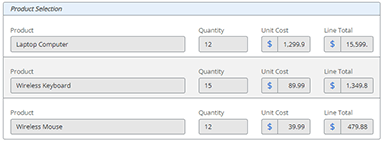
This blog post will show you how to effectively display repeating section data in a task form in your workflows. One of the many great features in a Nintex Automation Cloud (NAC) form is the Repeating Section control. Form designers have the ability to add a dynamic section of repeating rows to collect input data.... Continue Reading →
Create a Unique Item ID in a SharePoint Online List with Nintex Automation Cloud (NAC)
I cannot tell you how many times that I have seen a new item created in SharePoint list with the default Title field empty. You have probably seen this too if you have been working with SharePoint for any length of time. You go to a list view and all the items have an empty... Continue Reading →
Regular Expression to Get the First Digit Before a Decimal Point in a Nintex Automation Cloud (NAC) Workflow
Using the "Apply a Regular Expression" action in Nintex Automation Cloud (NAC) workflow, you can get the first digit (ones digit) before a decimal point. Here are the steps to follow: Insert an "Apply a Regular Expression" action into your workflow. Configure it with the following settings: Input text = Number from a workflow variable... Continue Reading →
Schedule a Workflow to Run on the First Day of the Month in Nintex Automation Cloud (NAC)
I recently needed to build a workflow in Nintex Automation Cloud (NAC) that only runs on the first day of each month. I knew the workflow needed to be configured as a “Nintex Scheduled start” start event, but there is currently not a configuration option in NAC to run it on the first day of... Continue Reading →
Regular Expression to Extract the First Part of a URL in Nintex Workflow
Using the Regular Expression action in Nintex Workflow, you can extract the first part of a URL and store it in a workflow variable to use in the rest of the workflow. Follow these steps to build out this functionality: Add a Regular Expression action to the workflow. Configure the action with the following options:... Continue Reading →